Secure your connection.
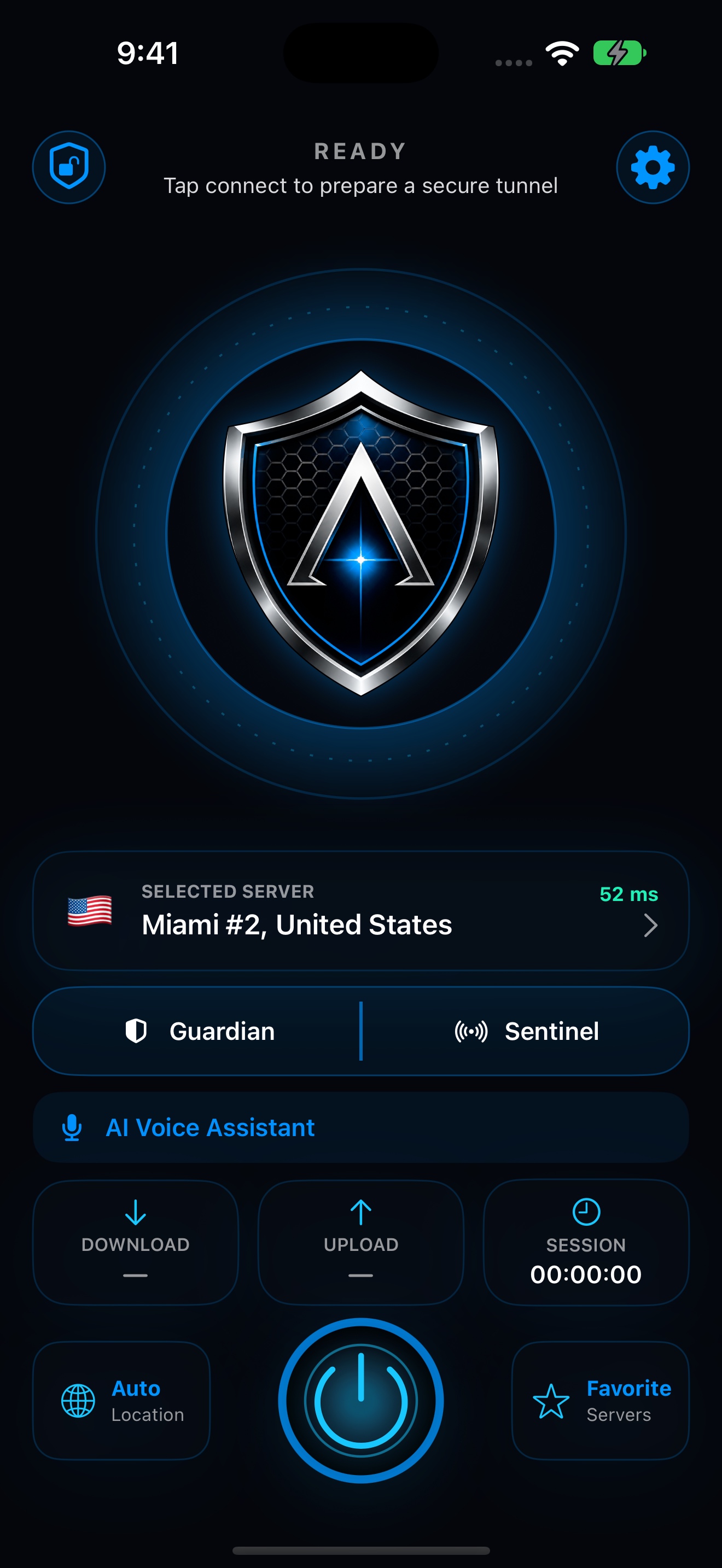
Tap the central power button to connect or disconnect your VPN whenever you need it.
 ARKTURIUSSECURE YOUR DIGITAL WORLDFOUNDING MEMBER PROGRAM ↗
THE ARKTURIUS PLATFORM
Arkturius combines VPN encryption, Guardian Mode with Encrypted Shield, Guardian Lock, Sentinel Mode, and AI Voice Control in one privacy platform.
WHY ARKTURIUS IS DIFFERENT
Explore the VPN, Guardian Mode, Guardian Lock, Sentinel Mode, and voice controls. Choose a feature to see what it does and where to find it.
Tap the central power button to connect or disconnect your VPN whenever you need it.
View your current VPN location at a glance and open the server selector whenever you want to switch locations.
Use Auto Location when you want Arkturius to select an available connection automatically.
Save preferred locations and reconnect to a Favorite Server without searching again.
Tap Guardian on the left of the protection row below your selected server to turn the encrypted Shield on or off. Its active state is verified on your VPN connection.
Check the app to see whether Encrypted Shield is active.
Tap the shield-and-lock button in the upper-left corner to engage Guardian Lock on an active VPN connection. Authenticate when you want to unlock and resume traffic.
Turn on Sentinel Mode for threat detection and check its status in the app.
Review download activity, upload activity, and your current session time without leaving the main screen.
Tap AI Voice Assistant or the central Arkturius shield and use natural voice commands to connect, disconnect, change locations, check connection status, or ask about your session.
Open Settings from the upper-right corner whenever you need to manage your app preferences.
PREMIUM CORE FEATURES
Every capability is shaped around what it gives you: less friction, more privacy, and clearer control.
Connect, disconnect, switch locations, choose Auto Location or a favorite server, and check session status with simple voice commands.
Turn on Guardian Mode on supported builds and check that Encrypted Shield is active.
Sentinel helps block known malicious websites and lets you check suspicious links on supported builds.
Activate Guardian Lock with your VPN connected, then use device authentication to unlock and restore protection. Tap the Guardian Lock button in the upper-left of the iOS dashboard.
Turn on Guardian Mode and check the app for confirmation that Encrypted Shield is active.
Intelligent automation helps you reach an appropriate connection quickly without navigating complicated controls.
 Global VPN NetworkPrivate access wherever life moves.+
A growing server network is designed for secure work, travel, everyday browsing, and entertainment.
Privacy is treated as a system principle—not an option buried inside a settings screen.
The network is designed to keep everyday browsing responsive while your traffic remains protected.
RAM-only server architecture is designed to reduce persistent data and strengthen the privacy model.
The service is designed around a no-activity-logs approach so your browsing history is not turned into a product.
Launch capabilities are designed to reduce manual steps when a connection needs VPN protection.
Founding Members can cover up to 10 supported devices. Future standard accounts are planned to include up to 3.
Save preferred VPN locations so returning to the connections you trust takes less time.
Let Arkturius help select an appropriate location when you want privacy without the extra decision.
MANUAL CONTROLTap Guardian below the selected server to toggle Guardian Mode.
TWO LAYERS OF INTELLIGENT SECURITY
Guardian Mode adds extra encryption. Guardian Lock pauses traffic. Sentinel helps block known malicious websites and lets you check links.
Turn on Guardian Mode for extra encryption. Check the app to see whether Encrypted Shield is active.
With the VPN connected, tap the shield-and-lock button in the upper-left to pause incoming and outgoing traffic. Authenticate to unlock and resume traffic.
Included with Founding Membership
GUARDIAN LOCK BUTTONTap the upper-left lock button; authenticate to unlock.
SENTINEL MODE
Sentinel helps block known malicious websites and lets you check suspicious links.
Turn on Sentinel Mode to help block known malicious websites.
Check a link for signs that it may be unsafe.
Refresh threat information from Settings.
Sentinel is not a device malware scanner. A missing warning does not establish that a site is safe. Available controls depend on your platform and app version.
SENTINEL QUESTIONS →KNOW WHAT YOU OPEN
Another check before your next click.
Use Sentinel alongside Guardian Mode and Guardian Lock. Each has a different job.
ARKTURIUS AI VOICE CONTROL
Arkturius behaves like an intelligent security companion—not a traditional VPN full of switches and settings. Ask naturally. Stay informed. Keep moving.
Connect me to Miami.
Connecting through Miami. Your encrypted session is active.
Turn on Sentinel Mode.
Sentinel Mode activated. Threat detection online.
How long has my session been?
You have been protected for 42 minutes.
Switch to my favorite server.
Your favorite server is selected. Check the connection status to confirm protection.
THE FOUNDER ADVANTAGE
Founding Membership unlocks Arkturius’s strongest launch package and keeps you connected to the platform as it evolves.
CONTINUOUS EVOLUTION
Arkturius is designed as an evolving security platform. The platform is continuously enhanced through software updates, with Guardian, Sentinel, and voice capabilities expanding as they are developed, tested, and ready. Available controls depend on platform and app version.
Your Founding Membership grows in value as the platform becomes more capable.
FOUNDING MEMBERSHIP
Lock in Founding Member pricing. Receive exclusive AI features. Protect up to 10 devices. Grow with every future Guardian update.